Tag a teammate and open a thread
Pull a colleague into a conversation with an @ mention inside an internal message, and open a thread on one message to keep the main timeline clear.
There are two ways to ask a colleague something in the middle of a customer's conversation: name them, or open a side branch on the message under discussion. This page does both.
Goal
The person you need is notified and can find the spot again, while the main timeline stays free of a long internal debate.
Before you begin
- Write permission on conversations — see Roles and per-feature permissions.
- The colleague you plan to tag already has an account in the workspace.
- The public/internal boundary from Reply to a customer, or write a note;
@lives on the internal side of it.
Steps
Open the conversation and press the Internal discussion tab in the composer.
In a customer conversation, @ works on this tab alone.
Type @ and a few letters of the colleague's name, then pick them from the list
that appears. Send the message as usual.
The tagged person gets an in-app notification, and the conversation turns up under Mentions in their left column.
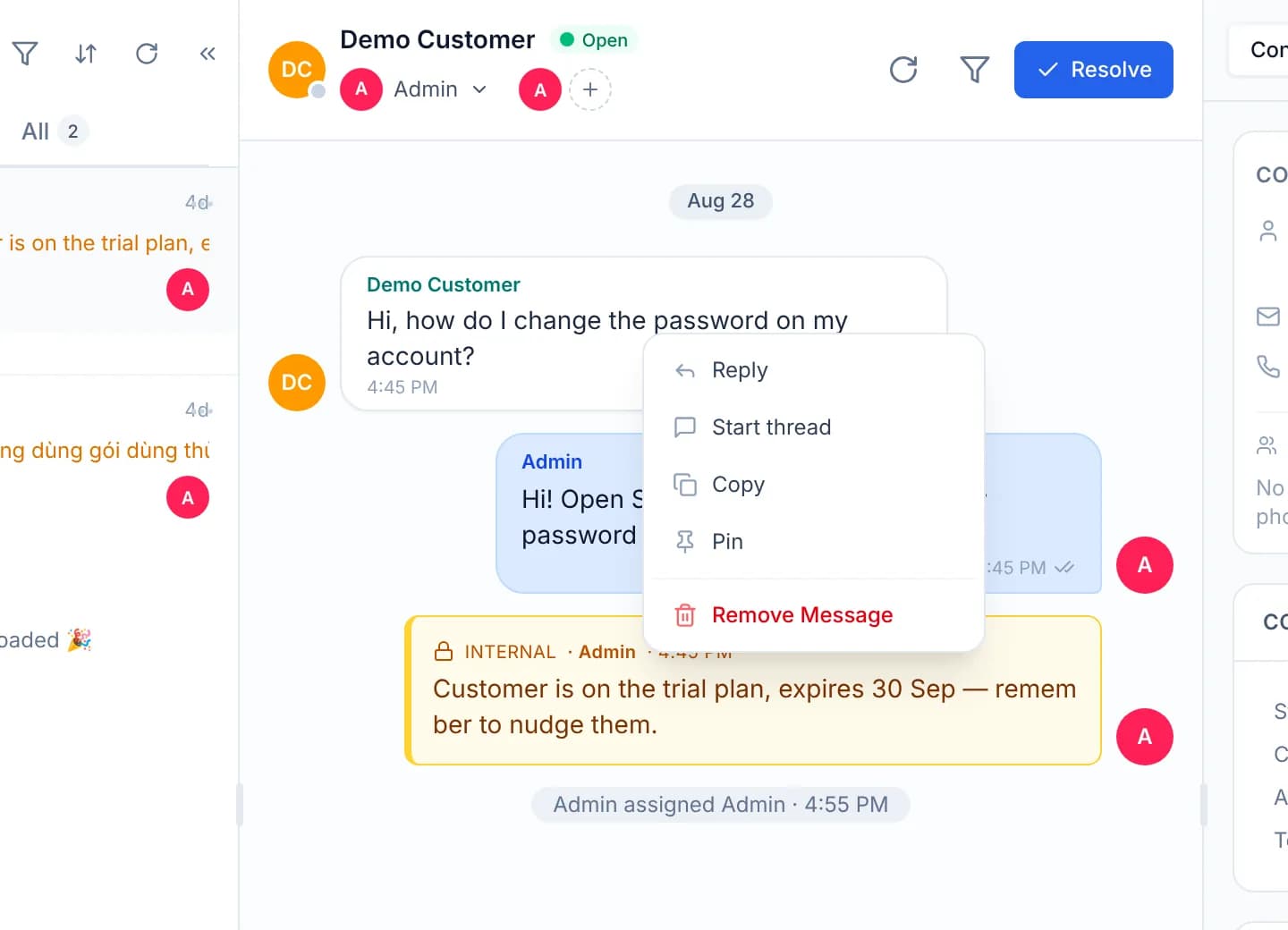
For a longer discussion about one specific message, right-click that message and choose Start thread.
Answer in the panel on the right, where the placeholder reads Reply in thread…. Press Back to conversation to return to the main timeline.
Review the branches you take part in under My threads. Each thread has its own Mute thread control, which leaves the conversation around it alone.
Switching tabs drops the tags
Moving a draft from Internal discussion to Reply clears the list of
tagged people, although the @Name text you typed stays. That is deliberate: a
message the customer receives must not put a colleague's name in their
Mentions list.
Verify
Open Mentions from the tagged account: the conversation has to be in that list. Back in the original conversation, the message carrying a thread shows a reply count under it, and clicking that count reopens the same branch. My threads lists it for everyone taking part.
Troubleshooting
| Symptom | Cause | What to do |
|---|---|---|
Typing @ brings up no list of names | The composer is on the Reply tab of a customer conversation | Switch to Internal discussion and type it again |
| The colleague receives no notification | The message went out publicly, so the tag was not recorded | Send the same wording as an internal message instead |
| Mentions is empty after being tagged | The list only takes conversations whose messages tag the account viewing it | Check which person was picked from the list when @ was typed |
| The thread opens and the main timeline disappears | The thread panel replaces the timeline rather than adding a column | Press Back to conversation |
Next steps
Reply to a customer, or write a note
Use the two composer modes: one sends to the customer, the other stays with the support team, and know exactly where the boundary between them sits.
Archive a conversation and mute it
Clear your own queue by archiving what you have finished, and mute a noisy conversation for a chosen period, without changing a colleague's queue.