Allow anonymous chat, or require a sign-in
Choose between letting visitors chat straight away and requiring a sign-in, learn why the pre-chat form is not an identity, and hand over a verified session.
The Who can chat section asks one question: must a visitor say who they are before chatting, and by what means. Your answer decides whether the data attached to a conversation can be trusted.
Goal
The channel runs in exactly one of two modes — anonymous chat, or a required sign-in — and you know how far the data in each mode can be trusted.
Before you begin
- The administrator role, or another role placed in a permission group that allows channel edits.
- If you plan to require a sign-in: the address of your own log-in page, and a developer who can connect your backend to api-engine.
- The
INTERNAL_API_TOKENenvironment variable set on api-engine. While it is unset that server-to-server door answers404rather than opening. - Read Roles and per-feature permissions if you are unsure your account may edit a channel.
Steps
In the left column press Channels, open the website widget channel, pick the Configuration tab and go to Who can chat.
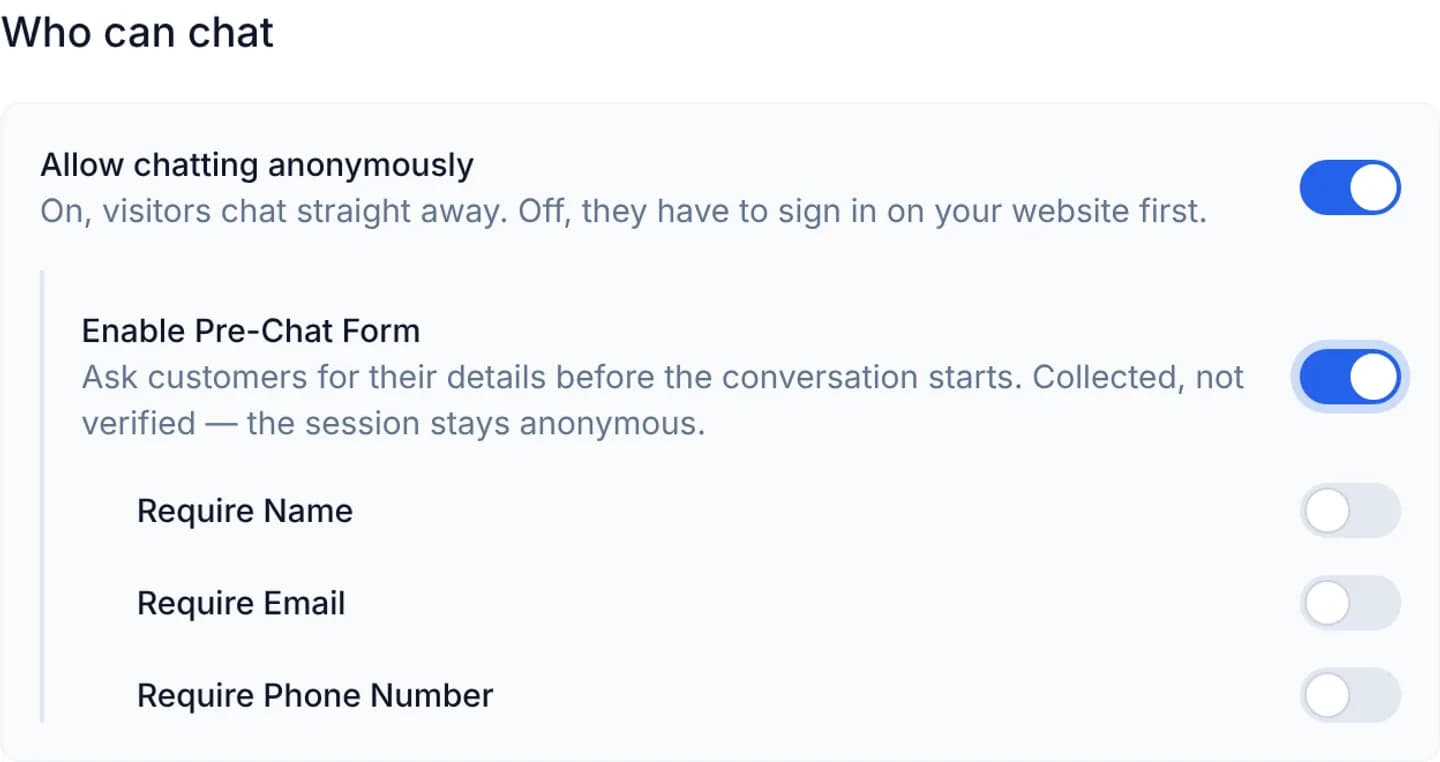
Leave Allow chatting anonymously on if visitors may chat without saying anything about themselves. That is the default for a new channel.
To ask for details before the first message, turn on Enable Pre-Chat Form. Three further switches appear underneath.
Choose among Require Name, Require Email and Require Phone Number. All three fields are always offered; these switches decide which of them a visitor cannot skip.
When you need an identity you can trust, turn Allow chatting anonymously off. The form disappears and a Log-in page field takes its place.
Fill in Log-in page with an address starting https://. The console refuses
to save while that field is empty or malformed.
Arrange the session handover on your own site, following the two snippets below. Without that step a customer can sign in and still not be able to chat.
Press Save Settings.
The pre-chat form collects, it does not verify. A visitor can type any name and any address, and nothing checks them. The session the form opens is an ordinary anonymous one. Never use those values to look up an account, confirm an order or reveal anything belonging to another customer.
Handing over a verified session
Only the sign-in mode gives you a trustworthy identity, and it travels through your backend rather than through the browser. Once your backend has authenticated the person, it calls the server-to-server door on api-engine:
curl -X POST "https://<your-api>/internal/widget-sessions" \
  -H "X-Internal-Token: <INTERNAL_API_TOKEN>" \
  -H "Content-Type: application/json" \
  -d '{ "inbox_id": <INBOX_ID>, "identifier": "cloudfly:1234567", "email": "person@example.com" }'
The response carries a widget_token. Your page hands it to the widget, and
clears it when the person signs out:
window.CustomChatSDK.identify({ widget_token: "<WIDGET_TOKEN>" });

// On sign-out. Widget tokens outlive a browsing session, so skipping this
// leaves the next person at a shared machine holding the same conversation.
window.CustomChatSDK.reset();
The two modes are mutually exclusive, and the console nests the form inside
the anonymous branch so you cannot switch both on. The reason: while the
channel requires a sign-in, the anonymous door
POST /widgets/:inbox_id/contacts answers 403 — and that is exactly where
the form posts. Both enabled would ask a visitor for name, email and phone
and then fail every submit.
Verify
In anonymous mode with the form on, open the widget in a private browser window. The form must appear before the composer, and every field you marked required carries a red asterisk on its label.
In sign-in mode, open the widget while signed out: the chat entry is replaced by a Log in to chat button pointing at the page you declared. Sign in on your site and reopen the widget: the composer must open, and that person's earlier conversations must come back.
Troubleshooting
| Symptom | Cause | What to do |
|---|---|---|
| Save Settings does nothing and Log-in page turns red | Anonymous chat is off and no log-in page was declared | Enter an address starting https:// |
| The visitor signs in and the widget still shows the log-in button | Your site never called identify() with the token the backend fetched | Add the session handover described above |
Your backend gets 404 from /internal/widget-sessions | INTERNAL_API_TOKEN is unset on api-engine, so that door behaves as if it does not exist | Set the variable and restart api-engine |
Your backend gets 403 from the same call | The X-Internal-Token header carries the wrong value | Compare it against api-engine's environment |
| The next person on a shared machine sees the previous conversation | The site never calls reset() on sign-out | Call CustomChatSDK.reset() in the sign-out path |
Next steps
Customize color, position and greeting
Set the brand color, launcher position and shape, avatar, welcome title and the sender name customers see, then switch on the channel greeting.
Add Zalo, Messenger and a hotline
Build the widget picker screen: an opening line and up to six routes — Zalo, Messenger, a hotline or any link — each with its own icon and address.